Procedural puzzle map generation
| Built with | Unity 6 (6000.4.3f1) |
|---|
Introduction
Ever since the first version of the project was done, I kept wondering whether our game could generate its own maps. It started as plain technical curiosity, and building the solver made the idea more concrete. With a Hamiltonian path, if you’re handed an answer, it’s easy to check that it’s correct. So I figured the reverse might work too, to some degree, starting from an answer and building a puzzle that it solves.
Short version: it’s technically possible, and I got as far as a working demo. But the user experience still falls short in a lot of places, and above all the maps aren’t as good as ones a person makes by hand, so this feature probably won’t survive to launch.
Building a regular path
The generator grows the map and an input sequence that solves it, one step at a time. From the current position it picks the next action, adds that tile to the map, and then runs it under the real game rules to check it.
The map draft UI
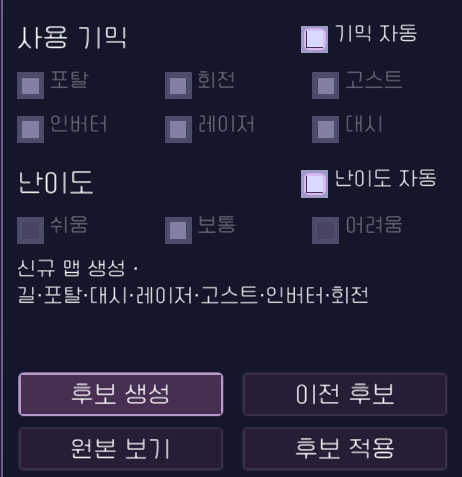
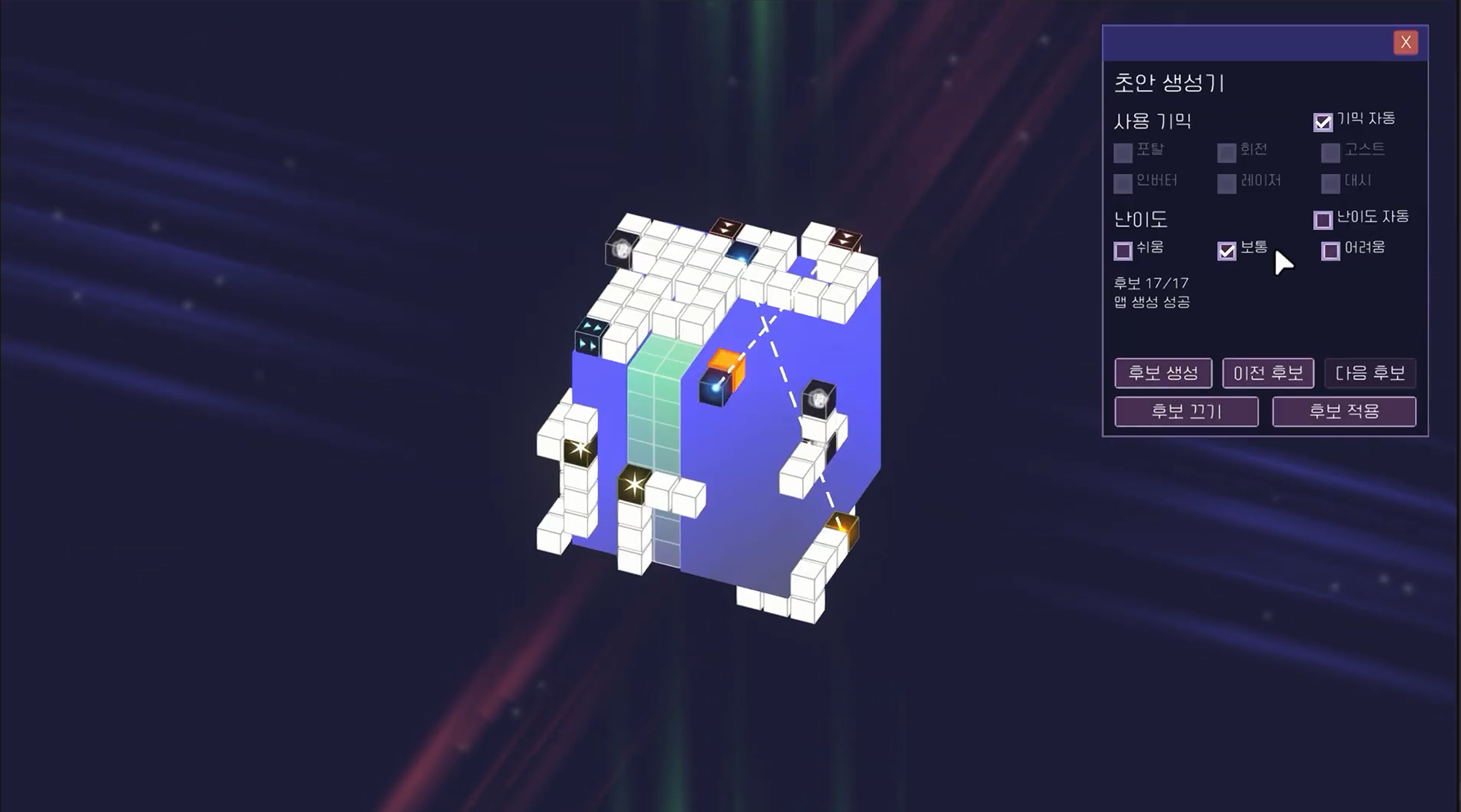
You pick the gimmicks to use and a difficulty in the UI, and those choices are turned into a structured GenerationPlan.
Every required gimmick you select has to be used at least once in the generated answer. If you deselect everything, it builds only regular paths.
The code can also take an explicit count and order of gimmicks, but I didn’t build that into the demo. I wasn’t sure that making someone who’s building a level spell out how many gimmicks there are, and in what order, actually helps.
Path search
The search for the next extension of the map is a DFS on a Stack<SearchFrame>. Each search frame holds the simulation state at that point, the candidates left, the input count, and the cost. If the next candidate fails, it restores the state and tries another one. I actually wrote this as a recursive function at first, hit a stack overflow, and switched to an explicit stack.
// NewMapGenerator.cs, Explore()
// Keep the search state here so long paths don't depend on the Unity worker thread's call stack size.
var frames = new Stack<SearchFrame>();
frames.Push(new SearchFrame(root, ExploreChoices(root).GetEnumerator()));
try
{
    while (frames.Count > 0 && !Stopped())
    {
        var frame = frames.Peek();
        if (frame.Choices.MoveNext())
        {
            var next = TryDescend(frame.Cursor, frame.Choices.Current);
            if (next != null) frames.Push(next);
            continue;
        }
        if (_candidate != null) return true;
        if (frames.Count > 1) _backtracks++;
        PopFrame(frames);
    }
    return false;
}
finally
{
    while (frames.Count > 0) PopFrame(frames);
}
Once every candidate is used up, it goes back to the previous frame. If the attempts given to a starting point run out too, it starts over from a new starting point, as long as the limit allows.
Simulation
| Data | What it holds | Role |
|---|---|---|
Initial board _board |
Tile types and initial coordinates | The layout saved as the final map |
Portal links _links |
Which entrance connects to which exit | Teleport relationships |
Inputs _inputs |
Direction inputs to run, in order | The record used to replay the answer |
Simulation |
Current position, painted state, ghost moves left, other events | The result of running the current action |
Simulation.Fork creates a state to test on, and TryStep runs the actual transition. Movement uses the solver’s movement logic as is.
When a new placement is added to a map that has gimmicks, ReplayPrefix runs the inputs again from the initial board. That’s because a new tile can extend the range of an earlier laser, or an inverter can affect the earlier answer.
// NewMapGenerator.cs, ReplayPrefix()
for (int i = 0; i < _inputs.Count; i++)
{
    if (i == previousInputCount && (replay.Position != cursor.Position || !replay.SameLayerTurns(cursor) ||
        !SameEvents(replay.Events, cursor.Events))) return false;
    int eventCount = replay.Events.Count;
    if (Stopped() || !replay.TryReplayStep(_inputs[i])) return false;
    // ...
}
When it’s generating only regular paths, adding one new neighboring cell doesn’t change how any earlier gimmick behaves. In that case TryAppendRoad just extends the current state.
At the completion step, the full input is checked again.
Using the solver
The solver is reused for the state transitions and answer checking mentioned above. The inputs recorded during generation go to VerifySequence, which runs them from start to finish and checks that the map really gets cleared.
MapCandidate returns the initial map, MapDocument, together with the check result, Witness. Witness holds the result of the run, such as the solution inputs and the gimmicks used. Since the answer was already built during generation, the final check just replays that sequence.
// NewMapGenerator.cs, ExploreChoices() completion condition
var witness = PuzzleSolver.VerifySequence(_board, _links, _inputs, axis, layers);
if (Stopped()) yield break;
if (witness.IsSolvable && (_plan.RequiredGimmicks & witness.UsedGimmicks) == _plan.RequiredGimmicks)
{
    _candidate = new MapCandidate(MapDocument.FromBoard(_board, _links, axis, layers), witness,
        _spent, _attempts, _backtracks);
}
Gimmicks
Budget and weights
The idea for this came from how Risk of Rain 2 spawns chests.
The budget limits how many paths and gimmicks get generated. Maximum Budget is the cap on spending, and the actual target cost is drawn from the Target Budget Min/Max Percent range. For example, with a budget of 200 and a target range of 60 to 100, it picks something between 120 and 200.
The cost of gimmicks that must be placed is reserved first.
// NewMapGenerator.cs, Affordable()
long reserved = 0;
foreach (var pair in _minimum)
    reserved += PlacementCount(pair.Key, pair.Value - _placed[pair.Key] - (kind == pair.Key ? amount : 0)) *
        PlacementCost(pair.Key);
return _spent + PlacementCost(kind) - credit + reserved <= _plan.Budget.Maximum;
One to three rotations in a row on the same layer are charged the rotation cost only once, but the input count and rotation events are recorded with the real number of turns.
A gimmick’s weight is used as the probability of picking it.
Laser
Laser candidates are made for each length within Minimum/Maximum Laser Ray Length, as far as there’s actually an empty straight line to fill. Every laser costs the same to use.
// NewMapGenerator.cs, ExploreChoices()
if (canLaser)
    foreach (var shot in TileHelper.Directions)
    {
        // Secure an empty straight path in the firing direction and a separate path to move along after firing.
        for (int length = 1; length <= _sampling.MaximumLaserRayLength; length++)
        {
            if (!Empty(entry + shot * length, cursor)) break;
            if (length < _sampling.MinimumLaserRayLength) continue;
            foreach (var escape in TileHelper.Directions)
            {
                if (escape == shot || !Empty(entry + escape, cursor)) continue;
                lasers.Add(new Placement(MapGimmick.Laser, entry, direction, entry + escape, shot, length));
            }
        }
    }
Later, when an inverter is being placed, it can make a candidate that swaps one of the regular paths a laser hit for the inverter. When it does, it checks that the events and the arrival state of the earlier stretch stay the same.
Ghost
Right now, candidates use the basic form where, after entering a ghost, you move TileHelper.GhostCount times (currently 5). The first four moves retrace cells that are already painted, and the last one lands on a new regular path and ends the effect. The same cell can be visited more than once.
The limitation is that you always have to move within blocks you’ve already visited, and you can’t push forward by making a new path. To allow that, it would have to reserve the gimmick type and the tile position so the block could be visited again later, and making the path come back to that spot naturally makes the logic a lot more complicated.
Ghost Paths Per Entrance limits how many path candidates are kept, and Ghost States Per Entrance limits how many intermediate states are checked while looking for them.
// NewMapGenerator.cs, AddGhostOptions()
// Follow existing tiles down to the depth where the ghost effect ends.
void Walk(Vector3Int current, int depth)
{
    if (options.Count - initialCount >= _search.GhostPathsPerEntrance ||
        ++examined > _search.GhostStatesPerEntrance || Stopped()) return;
    int first = _random.Next(TileHelper.Directions.Length);
    for (int i = 0; i < TileHelper.Directions.Length; i++)
    {
        var direction = TileHelper.Directions[(first + i) % TileHelper.Directions.Length];
        var next = current + direction;
        if (!next.IsOnSurface(_size)) continue;
        moves[depth] = direction;
        if (depth == moves.Length - 1)
        {
            if (next != entry && Empty(next, cursor))
                options.Add(new Placement(MapGimmick.Ghost, entry, input, next, default,
                    ghostInputs: (Vector3Int[])moves.Clone()));
        }
        else if (next == entry || !Empty(next, cursor)) Walk(next, depth + 1);
        // ...
    }
}
Inverter
The generator has to search both adding new paths and revisiting existing ones.
If unpainted cells are left after the flip, it makes candidates that move from the current position to an open existing cell. That includes paths painted only by a laser as well as paths you walked through yourself. A step onto a path that already exists adds no cost.
As mentioned earlier, to support using an inverter later on, it tries candidates that turn a regular path a laser painted into an inverter.
Rotation
The rotation gimmick is split into the placement process and what happens later while it runs.
If rotation is required, it prepares layers. If it’s optional, Optional Rotation Percent decides whether to prepare them.
The length of the first group is drawn from the length range, and if there’s room left for another layer, Additional Rotation Group Percent decides whether to add one. Every group follows the same length rule, and Rotation Group Gap leaves that many fixed layers between groups.
While running, on a layer that can rotate, it tries one to three rotations in a row within one group and checks whether that can lead onto a new path or connect to an open existing one. Candidates that undo the previous rotation by turning the other way are cut down.
Right before completion, RetainUsedRotationLayers keeps only the groups where a rotation actually happened. Then the whole solution is checked again with the cleaned-up layer settings.
Map shape
Now it makes maps that meet the gimmick conditions and can be cleared!
But the maps look too random and bunched up, because every next-move candidate was picked with equal probability.
To spread the map out more evenly, I use a scoring system.
Space score
| Factor | How it’s calculated | Tendency when raised |
|---|---|---|
| Region Penalty | Split the cube into thirds on each axis to make regions, and compute the fraction of occupied surface in each | Moves toward less filled regions |
| Contact Penalty | First contact with an existing path, not counting the cell it connects from | More space between paths |
| Crowding Penalty | Each extra contact with an existing path from the second one on | Fewer placements squeezed between several lines |
| Square Penalty | Whether it completes a 2x2 block | Fewer small clumps |
// NewMapGenerator.cs, TileSpacing()
int region = Region(cell);
int score = -_layout.RegionPenalty * _regionOccupancy[region] / _regionCapacity[region];
int contacts = 0;
var directions = TileHelper.Directions;
for (int i = 0; i < directions.Length; i++)
{
    var neighbor = cell + directions[i];
    if (!Occupied(neighbor)) continue;
    if (neighbor != connected) contacts++;
    // If the neighbor on another axis and the diagonal are both filled, this cell closes a 2x2.
    for (int j = (i / 2 + 1) * 2; j < directions.Length; j++)
        if (Occupied(cell + directions[j]) && Occupied(neighbor + directions[j])) score -= _layout.SquarePenalty;
}
if (contacts > 0) score -= _layout.ContactPenalty + (contacts - 1) * _layout.CrowdingPenalty;
return score;
For candidates that add several cells, like a laser, the entrance, the connecting path, the firing target and so on are scored together and averaged. Candidates in a rotated state are also converted back to initial coordinates to compute the space score.
Straights and bends
Paths shouldn’t run straight for too long, and they shouldn’t bend too often either.
Regular path candidates get RoadBendScore added. With r as the length of the latest run of regular paths in the same direction and L as Straight Run Length, the penalty works like this.
| Next action | Penalty factor |
|---|---|
| Go straight in the same direction | min(3, max(0, r−L+1)) |
| Turn while r=1 | 1 |
For example, with L=3 the penalty starts on the fourth straight step, grows the longer it keeps going straight, and stops at a factor of 3.
The factor is then multiplied by Bend Penalty. Raising Bend Penalty cuts down on both extremes, paths that bend too much and paths that are too straight.
// NewMapGenerator.cs, RoadBendScore()
int penalty = action.Input == direction ? Math.Min(3, Math.Max(0, run - _layout.StraightRunLength + 1))
    : run == 1 ? 1 : 0;
return -100 * _layout.BendPenalty * penalty;
A random value in the Score Variation range is added to the final candidate score. The higher Score Variation is, the more random the choice of the next candidate.
Testing
Below is a comparison with the single-player maps, from before map shape tuning was in.
| Compared | Median tile count | Median crowding ratio |
|---|---|---|
| 14 constellation maps | 73 | 31% |
| 16 generated maps · regular paths, fixed at 66 tiles | 66 | 88% |
| 15 generated maps · all gimmicks selected | 31 | 71% |
After map shape tuning, the crowding ratio went down.
| Generation settings | Before → after |
|---|---|
| Regular paths · fixed at 66 tiles | 88% → 37% |
| All gimmicks selected | 71% → 54% |
But if the map spreads out too much, the puzzle gets too easy, so it needs to be balanced.
Limitations
- It returns one verified answer. It can’t guarantee that the answer is unique.
- The difficulty setting affects the budget, gimmick weights, and layer setup. It doesn’t reflect actual solving time or how hard the choices are.
- Requests to edit part of an existing map are much more complicated, so I haven’t built that yet.
- It was designed on the assumption that in the ghost state you only move onto blocks you’ve already visited.
- Failing within the search limit doesn’t mean a map with those conditions can’t exist mathematically.
- The time limit depends heavily on the machine it runs on. That’s why I set it generously.